





DX-160 AC and DC Gauss meter

Introduction
Our DX-160 Digital Desktop Gauss Meter is a powerful tool designed for accurate measurement of magnetic fields. This device is versatile, reliable, and easy to use, making it an essential item for engineers, scientists, and researchers who work in magnetic field applications.
Built on advanced technology, DX-160 Gauss Meter is capable of measuring both DC and AC magnetic fields with high precision and sensitivity. The device uses a Hall effect sensor, which produces an output voltage proportional to the magnetic field strength. The measured magnetic field is then displayed on the device's digital screen in real-time.
This Gauss Meter is easy to operate, with intuitive interface and clear instructions. The device features various measurement modes and ranges. Users can take measurements with single or continuous mode, and switch between different units of measurement, such as Tesla (T) or Gauss (Gs).
Moreover, our DX-160 Gauss Meter is built with a durable, high-quality design, ensuring both reliability and accuracy. The device is designed with a sturdy handle for convenient portability, and it is equipped with a built-in rechargeable battery for extended usage levels.
In conclusion, our DX-160 Digital Desktop Gauss Meter is a reliable and high-performance tool that can measure both DC and AC magnetic fields with precision and sensitivity. It is an essential tool for anyone working in the magnetic field applications industry. With its durable design, intuitive interface, and advanced measuring capabilities, this Gauss Meter is the ideal device for your magnetic field measurement needs.
Features
|
5 ¾-bit resolution on VGA color panel |
Auto-zero, automatic/manual range |
|
Maximum/minimum/peak/valley value keeping and interface locking |
RS-232C interface/data output |
|
Data storage (auto/manual)/Historical data reviewing |
Zero setting / relative measurement mode |
|
Probe auto calibration / Auto memory operation mode |
Threshold setting and alarming |
|
Display units: Gauss, Tesla, A / M or Oe |
Time and brightness setting/ Temperature display |
|
Communication baud rate adjustment / working temperature display |
Dozens of optional basic or customized probes (standard 0.80mm ultra-thin probe) |
Specifications
|
Model-160 Specifications |
||
|
Range |
*(0.1mG-30G)/ (1mGs-300Gs)/ (0.01Gs-3000Gs)/ (0.1Gs-30KG) |
|
|
Resolution |
0.1mGs (0.01uT) |
|
|
Accuracy (display value) |
DC |
±0.20% of reading ± 0.05% of range |
|
AC |
±1% of reading |
|
|
Frequency Range |
DC mode |
DC |
|
AC mode |
AC 2Hz to 50kHz |
|
|
Analog Output |
Output voltage |
±3V F.S. |
|
Connectors |
Standard BNC |
|
|
Additional effects |
Temperature coefficient |
±(0.02% ±1 count)/ ºC |
|
Temperature range |
Working temperature |
0ºC to 50ºC |
|
Storage temperature |
-20ºC to 60ºC |
|
|
Panel display |
320 x 240 pixel, 3.5-inch full view color screen |
|
|
Communication interface |
RS-232 Standard 9-pin D-type connectors |
|
|
Supply power |
Voltage: 200/240v Frequency: 50-60 Hz |
|
Peripheral: computer, oscilloscope, industrial equipment, bus system
Application

4.1 Scientific research

4.2 Military industry

4.3 Medical field

4.4 Production industry
Functions
5.1High-precision AC / DC magnetic field measurement/ Temperature compensation system.
5.2Automatic / Manual Range: automatically adjust the test magnetic field range to a suitable gear in the automatic range, the manual range has three gears.
5.3Automatic / Manual Storage: This machine provides 1000 data storage spaces and automatically stores data according to a set time (1-60 seconds). Also it provides random storage and can be reviewed as per time and stored order.
5.4 Max / Min Lock: Turn on or off the peak measurement function. Capture and display the highest and the lowest magnetic field readings, and lock the interface.
①. First gear: Maximum/minimum/peak/valley holding
②. Second gear: interface locking
③. Third gear: relieving
5.5 Auto Zeroing mode
①. Relative zero magnetic field mode: put the probe into the chamber of the Zero-Gauss calibrator, zeroing and storing the data.
②. Eliminate geomagnetic field mode: horizontally put the probe make sure it is to be vertical against the geomagnetic field, zeroing and storing the data.
5.6 Communications and drawing:
5.7 The RS-232C interface function
①. The user can use the computer to read test data, draw various survey maps with professional mapping software, and transmit and print chart
②. With serial real-time transmission function of real-time monitoring real-time data in a computer
③. Query real-time data through fixed instruction
At the same time, DX-160 monitoring analog output ( BNC ) can provide auxiliary automation capabilities without PC circumstances.
Product details

Front View

Back View

Side View
The Interface of Mapping Software

Mapping software interface

Picture 1: D plot of rectangular magnets

Picture2: D plot of elliptic magnets

Picture3: D plot of cylindrical magnets
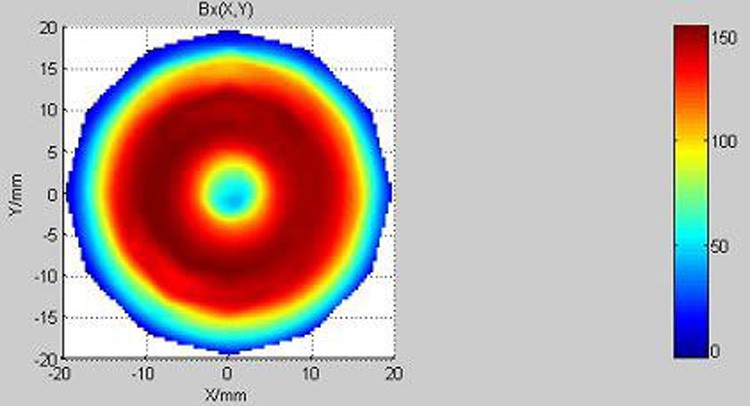
Picture4: D plot of circular magnets

Picture5: D plot of multipole ring magnets

Picture6: Magnets 3D distribution vector diagram